⌃⌥⌘L→Copy PR link
Same key, 1 app so far - tap the tabs
Context-aware
One key means something different in each app and site. No collisions, nothing to memorize.
Turn the 20 clicks you repeat all day into one keyboard command.


That four-key chord becomes two: hold Caps Lock, tap a letter. As easy as ⌘V - and a hundred times more powerful.
Almost nothing else binds ⌃⌥⌘, so your shortcuts never collide. New to hyper keys? →
Every repetitive task is a choice: pay for it with your time, every time - or spend one minute turning it into a command.
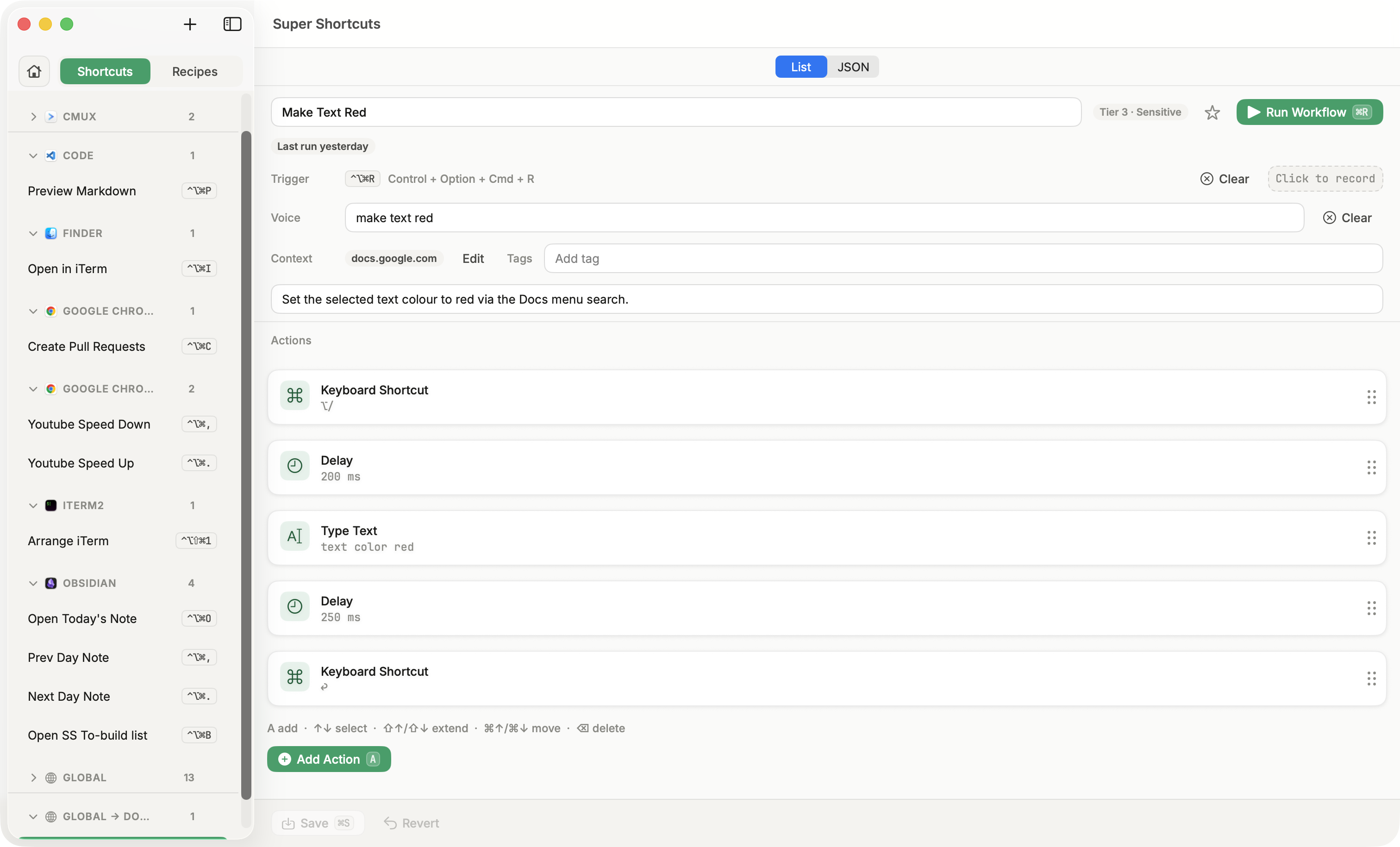
Select the text, up to the toolbar, open the palette, hunt for red… and again tomorrow, and the day after, forever.
Highlight, press ⌥ /, type "text color red", hit enter. That's the whole setup.
Pro tip: ⌥ / opens Google Docs' menu search - all kinds of shortcuts hide in there.
Press ⌃⌥⌘R and it replays those steps itself, in two seconds. Or say it out loud when your hands are full.
Every shortcut you bind is kept in the cheat sheet. Hold the Hyper key and it appears - showing every automation bound for the app or site you're in, right on its keys.
A few of the workflows each of these people can build in minutes:
Copilot writes the code. The rest of your day is PR links, test runs, and repo hopping - bind those to the hyper key and stop hunting menus.
Your close week is a hundred tiny repeats: you paste into sheets, send the same status replies, open the same three tools per client.
You context-switch for a living. One keystroke opens the whole mode - terminal, calendar, the three tabs - laid out where you want them.
Real, ordinary workflows you can assemble in minutes from the same building blocks above.
Same key, 1 app so far - tap the tabs
One key means something different in each app and site. No collisions, nothing to memorize.
Forget a binding? Hold the hyper key and every command lights up on your keyboard. Never memorize again.
Hold to talk, release to run - it fires the same commands you built. Transcribed on your Mac.
No cloud, no account, no waiting on a server. It all runs on your Mac. No Wi-Fi, no problem.
Install a ready-made command, run it, then make it yours.
Point-and-click automation that keeps working when layouts change.
Keys, clicks, text, opening apps, even Apple Shortcuts - in one command.
If you can type in it, you can command it - editor, browser, inbox, chat.
Don't start from a blank page. Install a ready-made command, run it, then make it yours.
Built-in packs for Google Docs · GitHub · VS Code · Meetings · Global.
Not "synced for convenience." Not "anonymized." Your automations and your voice are processed on your Mac and stay there. Offline? They still run.
Private by design. The only data we collect is opt-in product telemetry - never your workflows or voice. It asks for the standard macOS automation permissions, explains each before you grant it, and you can revoke anytime. How permissions work →
Get Super ShortcutsSuper Shortcuts coexists happily with the launchers and macro tools - this is just where it's different.
| Super Shortcuts | Raycast | Keyboard Maestro | Apple Shortcuts | |
|---|---|---|---|---|
| Fires in place, scoped to your app, site, or window | Yes | No | With setup | No |
| Hyper-key layer with a hold-to-see cheat sheet | Yes | No | No | No |
| On-device voice control | Yes | No | No | No |
| No-collision trigger (⌃⌥⌘ + a letter) | Yes | No | No | No |
| Runs locally and offline | Yes | With setup | Yes | Yes |
| One-time purchase, no subscription | Yes | No | Yes | Yes |
Nobody loses an afternoon at once - you lose it five seconds at a time, all day. Here's a typical week, and what winning it back is worth to you.
*Up to 2 hrs a week is what we measure in our own daily use. Payback is against Pro's one-time $39.
Free to use, with a 14-day Pro trial on every install. Go Pro once to remove the limits - no subscription.
For getting started.
Launch price · $49 after launch
Everything in Free, plus:
At $50 an hour, Pro pays for itself in 3 days. Run your own numbers ↑
Practical, no-fluff guides to the hyper key and the small workflows it powers.


Privacy, permissions, pricing, and how it stacks up. Still stuck? Read the docs →
No. Commands fire on the hyper key (⌃⌥⌘ plus a letter), a combo almost no app binds. And each one is scoped to a context, so the same chord can mean different things in different apps - or even on different websites, like github.com versus a Google Doc - without ever colliding.
Everything runs on your Mac. Voice is transcribed on-device and never sent anywhere, and routine runs stay local. Every command is a workflow you can open, read, and edit, so there's no black box.
The standard automation permissions (Accessibility, and Automation for some actions) so it can drive your apps. We explain each one before you grant it, and you can revoke them anytime in System Settings.
Raycast and Alfred are launchers you summon; Super Shortcuts fires in place, scoped to where you are. Keyboard Maestro is a deep macro engine; this is the fast, memorable layer on top, with no macro mental model. Apple Shortcuts is broad but detached from your live context. It coexists happily if you already run your own hyper key.
AI agents are great for one-off, open-ended work. Super Shortcuts is for the things you do twenty times a day: it runs the exact steps you chose, the same way every time, in a couple of seconds - offline, with no tokens, no waiting, and no improvising with your data.
No. Install a ready-made command from the starter library (Google Docs, GitHub, VS Code, Meetings, Global), run it, then make it yours.
The app keeps score. Every run is counted, and the Home dashboard shows time saved this week, your streak, and your top commands - your number, not our marketing.
No account. Super Shortcuts is free to use for up to 20 workflows, with every action and a starter template library. Pro is a one-time purchase - $39 as a launch price, going to $49 after launch - that unlocks unlimited workflows, voice control, the Element Inspector, and the full template library. Every new install also gets a 14-day Pro trial, no card required.
No. Pro is a one-time purchase - pay once, it's yours, and updates are included for life. (We may offer optional paid add-ons down the road, but the app you buy today stays a one-time purchase.)
There's a 30-day money-back guarantee. If Super Shortcuts Pro isn't for you, email [email protected] within 30 days and we'll refund you in full.
No. Updates are free for the life of the app and install themselves - Super Shortcuts checks for new versions and updates in place, so you're always current.
macOS 12 (Monterey) or later, on Apple Silicon or Intel. The download is about 16 MB.
Free to try, with a 14-day Pro trial. Build your first automation in under a minute - and keep the hours. No account, runs locally, yours after one payment.
Not ready yet? Follow along - the occasional update, no spam.